Showing posts with label CSS. Show all posts

CSS Secrets in Big Pages

css code example

Learning from best websites is a good practise and sneak peaking to CSS files is a common thing among many web developers because you can see how one or another thing is done. During one CSS file analysis from well known imdb.com site (which is biggest movie review's site) I found interesting sally to Internet Explorer browser. The original CSS code fragment looks as following:

* html #nb15iesux { margin-left: -900px; position: relative; }

css code example Notice how CSS class is named #nb15iesux. This is maybe because coder wanted to express his opinion about Microsoft products. The code fragment is a fix for displaying problems related to IE6 which has some difficulties with CSS. All major issues were fixed in IE7 so this is still a good browser. Hovewer if you want make sure your site looks the same in every browser you should test and implement all workarounds.

Related reading: If you want easily see css files from webpages I suggest you to install very usefull Firefox add-on called Firebug.

How to Center Align Div Tag Element Using CSS?

CSS

If you're creating your design using css instead tables you could probably run into problem how to center div element in your page. There is no such css rule float:middle which probably could help to center this div.

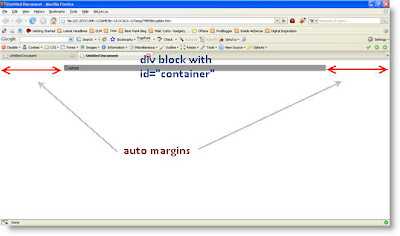
The solution is very simple in fact. All you have to do is to define margin: 0 auto; property in your css code. For example you have some div like

<div id="container"> Content </div>
and want to center it in the page. In your CSS zone type:

.container{ width: 860px; margin:0 auto}
The result would be as shown in the picture bellow

css centering div block

You can test it out by copying the code below to your text editor (i.e. Notepad) and save it with .html extension.

<!DOCTYPE html PUBLIC "-//W3C//DTD XHTML 1.0 Transitional//EN" "http://www.w3.org/TR/xhtml1/DTD/xhtml1-transitional.dtd"> <html xmlns="http://www.w3.org/1999/xhtml"> <head> <meta http-equiv="Content-Type" content="text/html; charset=utf-8" /> <title>Tips4weblife.blogspot.com</title> <style type="text/css"> <

#container { width: 860px; margin: 0 auto; background:#999999; } </style> </head>

<body>

<div id="container"> <p>Content</p> </div> </body> </html>

17 CSS Colors Defined by Name. All examples.

CSS colors (colours)

CSS gives you the ability to define text (font) colors without hexadecimal values or RGB but only with color names. Currently there are 17 color names in CSS which are supported and validates against CSS validator. These are: aqua, black, blue, fuchsia, gray, green, lime, maroon, navy, olive, orange, purple, red, silver, teal, white, and yellow Latest added color is orange.

Question: How to set color value in CSS? Answer: It's simple

Suppose you have a block of text. To begin defining color value at first put this text block in a div tag:

<div> Text block goes here </div>

Then right after letter v in first div tag add the following line style="color:blue;" After that your code block should appear like this <div style="color:blue;"> Text block goes here </div> Preview webpage in your browser, text block should be blue. This method of adding colors to text isn't best because it's inline css, better practise is to put css code outside main page in separate stylesheet. But the syntax remains the same.

Bellow is a list of all 17 colors supported by css, you can see how your browser and monitor deals with colors. It's not images but blocks displayed with a support of CSS. Note that you can set color not only for text, but also for backgrounds and borders.

aqua
black
blue
fuchsia
gray
green
lime
maroon
navy
olive
orange
purple
red
silver
teal
white
yellow