


Everybody is concerned about not letting their email be added to spammers database. It is advised not to leave your main email address in the comments or forums because there it can be easily detected by spam spiders. You can use your less important secondary email or just use disposable email.
Other ways for protecting emails are distorting - adding additonal chunk of text which has to be removed. For example:johnREMOVETHIS@maill.com Programs can't recognize the meaning but people surely will understand.
Another way is to use special character for the @ sign. Just replace @ with @ Then your email will look to spiders like: john@maill.com but humans will see john@maill.com
All these and other techniques can't quarantee you 100% because even spiders get smarter. They can be programmed to search words like REMOVEME and actually remove them or replace code @ with @. I thought out another way to hide your email from spiders, its by using flash. Even google can't index flash content so does spiders. If you put your email into flash clip only humans could read it. So what you need is to make a simple flash clip with dynamic text. Users could highlight and copy it to their email programs while spiders will go by and don't notice there is a mail address.
If you are unfamiliar with Flash CS3 don't worry below is very simple tutorial how to make such a clip with your email address inside it.
At first you have to download Flash CS3. You can use trial for 30 days and don't pay any money.
- Open Flash CS3 and select Create new flash file (ActionScript 2 or ActionScript 3)
- Change canvas size to about 150px width and 50px height (or any size which suits your site)

- Click on text tool and write down your email address

- Change type of text to dynamic. This will give people the ability to select and copy text from flash file.
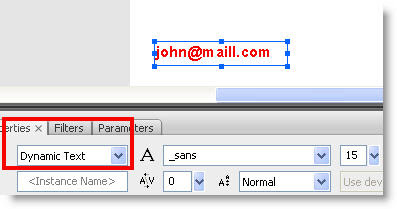
- Now create a flash file which has your email address inside. At first test how your clip will look like by hitting Ctrl+Enter. Test if you can select and copy text from the flash clip and make any corrections (add color, change size or font). Save your flash file as myemail.fla on the desktop and hit Ctrl+Enter again, this will render your flash clip and save it in the desktop too. Note that .sfw files are saved in the same location as .fla files are, unless you change output location in the Publishing Settings.

- Now when you have this flash file with your email safely hidden you can add it wherever you like in your blog or site. Of course you won't be able to put it in comments or forums in other sites but it will perfectly work as your primary email guard in a blog.
Add flash file to blogger
To add flash file to your blogger blog you need to upload the file first to googlepages (or other hosting source). Copy the address of uploaded flash file and paste it after src=" in the folowing code:
Adjust height and width to your needs and paste this code block into html area in your post. The example is shown bellow. A flash clip is embedded into blogger (you can select and copy to clipboard).
Flash clip with email inside it

 icon in the lower right corner of firefox browser.
Let's take an example and save one flash game from
icon in the lower right corner of firefox browser.
Let's take an example and save one flash game from  Highlight main.swf file and hit Download. Now you have this game on your computer and can play offline.


