World Premiere of Games in February.

The most interesting games to be released in February 2009.

Date Name Genre More info
February 5 "Burnout paradise" racing http://burnout.ea.com
February 13 "F.E.A.R. 2: Project Origin" shooting http://projectorigin.warnerbross.com
February 18 "Warhammer 40.000: Dawn of war 2" strategy www.dawnofwar2.com
February 20 "Wheelman" action www.wheelmangame.com
February 20 The Sims 3" simulator http://thesims3.ea.com
February 24 "Drakensang: The Dark Eye" rpg www.drakensang.com
February 24 "Cryostasis: The Sleep Of Reason" shooting www.crysotasis-game.com
February 27 "The Godfather II" action www.ea.com/godfather2

Optimize your Blogger Blog for SEO

SEO optimization for blogs can bring you tons of new visitors without using PPC compaigns or any other costly way of attracting new readers. You get your free and highly interested in topic visitors from Google.

Standard Blogger blog hasn't the feature to input your own meta keywords and description into a blog. Many bloggers forget that and don't pay any attention, but creating your Blogger blog more SEO and search friendly will bring great benefits inluding your Adsense income.

To include those 2 important meta tags in your blog:

  • Go to Layout mode and select Edit html;
  • Find closing </head> tag (Ctrl+F) and type those lines:

<meta name="Keywords" content="keyword1, keyword2" />
<meta name="Description" content="description for your blog " />

  • Adjust description and keywords text for your own needs.
  • Save Template and Reload your blogger blog.

Tip. You can check your metatags for every page on the internet with Firefox. Install famous Web Developer toolbar addon and press Information->View Meta Tag information.

Upload any file to Humyo

25Gb free space for any type of media files and additional 5Gb of space for non media files. This web2.0 website allows easily trandfer your files from computer and keep them online for use outside your home. Built in media player allows you to listen and watch mp3 songs and videos. You can even access your file from mobile phone. Humyo auto detects what type of device you are using and then presents appropriate format for your device. You can even install a small program that creates another hard drive icon in your My Computer folder so you extend your computer's hdd capacity by 30Gb.

You can open files direct from your storage space and save documents direct to your humyo from your PC applications. Your humyo drive is compatible with all applications so you don't have to change the way you work to get the benefits of humyo.

Grab your 30Gb today and store your files online. Almost no restrictions apply, you can even upload files bigger than 1Gb.

Humyo

Faster Turn Off and Start Up your Computer

When you have Windows installed for several month or more it can become very slow. It's not only your programs run slower than usual but also Shut Down and Start Up time increases a lot. What you can do to make computer turn off and start up faster? One way is to reinstall windows or add more RAM but if you have many programs instaled which you need to use everyday, you can not afford to go with fresh Windows installation. Searching for drivers alone could cost you a half day. Buying RAM is good but also needs time and investment.

The easiest way to decrease up and down time for your computer is to use hibernate function. Off course you know about hibernating but do you really used it? You will be impressed with the results. It can take up to 2 or 3 minutes for old and stuffed computer to shut down but with hibernating you can leave your computer after 15-20 seconds. Starting up also takes much less time.

The main concept of hibernating is that computer saves all the information of working Windows OS to the hard drive and later only has to load already working Windows session. You can even watch DVD movie from the point where you left before hibernating.

How to use hibernation?

Press Start button and as usual select Turn of Computer. On the popup window press Shift and you will see that Standby button changes to Hibernate. Press it and you're done. Literally you can continue one session even a month if you never shut down your computer fully. But I suggest you to do so once in a while because sometimes one program can become unstable and you will load that error again and again, but if everything works fine you can hibernate as much as you want.

hibernate Hibernate your computer

A Free Video Editor for Small Projects

video spin logo

Pinnacle decided to release a free version of video editing software called VideoSpin. This program is absolutely free and can be used to create and edit your home videos or just mix some video clip from various sources. For 15 days you can use all the features of VideoSpin but after this period you won't be able to save your movies to iPod compatible, divx, mpeg-2 and mpeg-4 file formats. However you still can save videos as avi, mpeg-1 and flv formats.

VideoSpin supports transitions, title making, adding images to video projects, adding external sound clips.

video spin editing optionsApart those one the niciest feature about VideoSpin is that it can upload your rendered video straight to Youtube and Yahoo! Videos. You just have to enter your login details, video title and description, and VideoSpin will take care of the rest.

video spin youtube screen video spin main window

Download VideoSpin here

No Roll Over Alt Text with Firefox?

you see alt text

If you noticed that when you place an image in your blog and roll over it in Internet Explorer you get alternate text displayed for several seconds, but when you try to do it in Firefox the text doesn't show up. This is because Firefox doesn't display Alt text like IE does.

This is quite strange but the fix is really easy. If you add a title attribute to an image then even Firefox will display it as an alternate text.

Blogger doesn't provide you with instant title attribute adding feature but it's really not difficult. Just insert image as you allways do by clicking on the Add Image button and then go to Edit Html mode. Locate where is the image tag and add the following line after src attribute:

title="some image title to display on roll over".

Your whole image tag would look like this:

<img id="..." style="FLOAT: right; MARGIN: 0px 0px 10px 10px" alt="you see alt text" title="you see title text" src="..." border="0" />

When you have only Alt attribute in the img tag then IE will display it but Firefox won't, when you have both Alt and Title attributes, then both browsers will display title attribute. Using title attributes with images can improve your blog or site in a way that it can be indexed better by search engines and Firefox users will see Alt text as well.

Bellow is two images working as examples:

This image has only Alt attribute (Alt="This is Alt text") , if you read this blog with Firefox you probably don't see when roll over

You see alt attribute text

This image has both Alt and Title attributes. You should see roll over text on both IE and Firefox

You see alt attribute text

Related: How to display Html code in Blogger

Human Long Term Memory Limits

old woman reading a book

Few days ago I found a small note in the local newspaper stating that according to scientists human memory is in fact limited, differently from computers which has an increasing memory capacity. If you have to remember many facts in a short period of time you probably have to erase some small information of the past. It can be obscure moment of some event few years ago or (most important) an invaluable memory of a childhood.

The process of remembering involves junctions and associations making in humans brain. The memory making process is not yet clearly understood. Some life moments we remember very brightly and some only on special circumstances like smell can awake an old remembrance or return to specific place.

I can think 2 possible solutions to this issue. One is to try to remember old and bright moments as much as you can. This method will work like a second repetition of remembering events and improve those associations in the brain. Second method is to borrow an idea from computers, i.e. write everything to a diary or notes (Google notebook) and you'll have a backup for your memories.

Check If Your Website or Blog is Reachable Globally

WatchMouse mouse

If your website loads very fast for you doesn't mean this is so in every part of the world. Your hosting company may limit bandwidth to other countries and your visitors may experience trouble exploring your site. The simplest way to check your site's loading speed is to open it in every country but of course it is impossible. Other way is to ask your IM friends to check how the site loads for them but it is also not very convenient. Luckily there are free service which does it for you.

WatchMouse can check any site loading time from 10 places scattered all over the world. You only have to type in your web page and hit enter. After several seconds you will get a results list which show average Resolve, Connect and Download time of your site.

This is quite accurate measurement because countries includes Melbourne (Australia), Asia (Shanghai), Europe, South and North America.

The WatchMouse site also offers you to watch your host 24/7 for additional fee or install small program and ping your site continuously.

Bellow is the results page for my blog Tips4Weblife. Seems that no problem was detected and everybody could view it without problems.

diagram pinging

Find Middle Point for Any Picture With No Software

highlighted picture of pc

If you need to find where is the middle line in picture you can quickly do it by trying to select the picture. Left click on white space near the image and start pushing mouse to the other end of the picture, when you approach middle vertical line the picture becomes highlighted. Swing the mouse left-right-left and you can imagine where is the middle of the pic.

Keep in mind that picture itself must be displayed in a browser not in image viewer for example.

Create Text Mirror Effect with Fireworks CS3

Here is a simple tutorial on how to make text (logo) with mirror effect in Adobe Fireworks. This type of text and photos became very trendy.

  1. At first open Adobe Fireworks and create a blank project with your prefered canvas size.
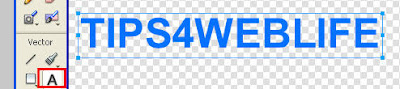
  2. Then select Text tool and type in your text. Choose size and color before you start creating mirror effect because it would be easier to match real text and mirrored part.
  3. mirror text fireworks
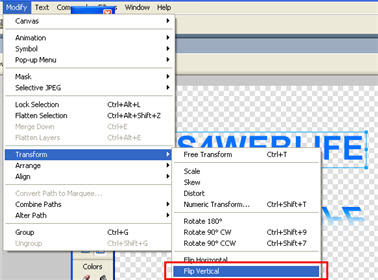
  4. After your text is typed on the stage dublicate it and flip vertical. To do so select text with Pointer arrow and press Ctrl+Alt+D then go to Modify -> Transform -> Flip Vertical
  5. mirror effect text
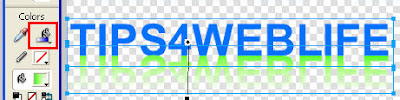
  6. Align flipped version of text with normal text so that they are one above the other.
  7. mirrored text effect
  8. Select flipped text and grab gradient tool or press G for shortcut. Drag with gradient tool selected top down on the text. You will see some gradient with default colors. Now you must change the gradient's color and opacity
  9. mirror text effect
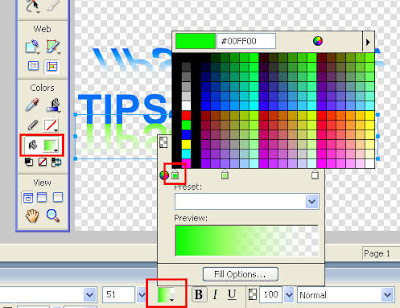
  10. Press the color window with bucket icon to show color pallete. Notice gradient line with some arrow selectors on the top, here you can change color and opacity. The most simple gradient is with solid color and opacity 100% on one side and white color and opacity 0% on the other.
  11. mirrored text
  12. Click on the bottom left selector and select color that match your original text. Click on middle bottom selector to adjust color if needed. Now click on those top selectors and adjust opacity. text mirored miror
  13. Skew the mirrored text to add some realistic drop shadow feel. The final result should be something like this. final mirror text effect

Of course you can make this effect much better, just play around with textures, colors and opacity levels.

Hide Your Email From Spam Spiders With Flash

NO SPAM EMAIL

Everybody is concerned about not letting their email be added to spammers database. It is advised not to leave your main email address in the comments or forums because there it can be easily detected by spam spiders. You can use your less important secondary email or just use disposable email.

Other ways for protecting emails are distorting - adding additonal chunk of text which has to be removed. For example:johnREMOVETHIS@maill.com Programs can't recognize the meaning but people surely will understand.

Another way is to use special character for the @ sign. Just replace @ with &#64 Then your email will look to spiders like: john&#64maill.com but humans will see john@maill.com

All these and other techniques can't quarantee you 100% because even spiders get smarter. They can be programmed to search words like REMOVEME and actually remove them or replace code &#64 with @. I thought out another way to hide your email from spiders, its by using flash. Even google can't index flash content so does spiders. If you put your email into flash clip only humans could read it. So what you need is to make a simple flash clip with dynamic text. Users could highlight and copy it to their email programs while spiders will go by and don't notice there is a mail address.

If you are unfamiliar with Flash CS3 don't worry below is very simple tutorial how to make such a clip with your email address inside it.

At first you have to download Flash CS3. You can use trial for 30 days and don't pay any money.

  1. Open Flash CS3 and select Create new flash file (ActionScript 2 or ActionScript 3)
  2. Change canvas size to about 150px width and 50px height (or any size which suits your site) flash cs canvas size
  3. Click on text tool and write down your email address flash text type
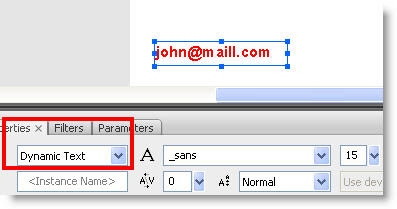
  4. Change type of text to dynamic. This will give people the ability to select and copy text from flash file. text input type
  5. Now create a flash file which has your email address inside. At first test how your clip will look like by hitting Ctrl+Enter. Test if you can select and copy text from the flash clip and make any corrections (add color, change size or font). Save your flash file as myemail.fla on the desktop and hit Ctrl+Enter again, this will render your flash clip and save it in the desktop too. Note that .sfw files are saved in the same location as .fla files are, unless you change output location in the Publishing Settings.
  6. Now when you have this flash file with your email safely hidden you can add it wherever you like in your blog or site. Of course you won't be able to put it in comments or forums in other sites but it will perfectly work as your primary email guard in a blog.

Add flash file to blogger

To add flash file to your blogger blog you need to upload the file first to googlepages (or other hosting source). Copy the address of uploaded flash file and paste it after src=" in the folowing code:

<object width="140" height="50"> <param value="email.swf" name="movie"/> <embed width="140" src="PATH TO myEMAIL.swf file" height="50"> </embed> </object>

Adjust height and width to your needs and paste this code block into html area in your post. The example is shown bellow. A flash clip is embedded into blogger (you can select and copy to clipboard).

Flash clip with email inside it

Display Html (and other) Code in Blogger

Sometimes you may need to show html, php or other language code in your post but when you write or paste it what happens is it dissappears and even worse damage your whole article. This is because blogger automatically recognizes code and use it as html source even if you insert it in compose mode. The example bellow shows what happens when you insert image tag. Blogger automatically converts it to html and show empty image, but what you wanted is only display this code as an example for your readers.

<img src="/image.gif" width="100" height="75" />

Now let's see how to easily insert a block of code into blogger post. The trouble begins when blogger reads less than sign (<) in a post, it signals that a code is being started and if blogger sees whole <div> tag it auto converts it. What you have to do is to convert special symbols to html entities. For example when you want to show less than sign (<) type &lt; , for greater than symbol (>) type &gt; and so on. Off course doing this by hand is very inneficient way. You can convert code text into html text by simply pasting it to Dreamweaver and copying code from code window.

dreamweaver window code view

1. Write code in Dreamweaver's design window and select it

2. Copy selected code from code window. This code is ready to paste into your blogger post. All symbols will be displayed correctly.

How to Remove Metadata in Pictures

image properties with metadata creation software adobe photoshop cs3

When you edit your images Adobe Photoshop (and other programs) adds a line in picture properties revealing that it was modified, for example Creation Software Adobe Photoshop CS3 Windows is added in image properties. The same goes with digital cameras, they also add lots of metadata in image properties (like Camera model, Shutter speed, Date picture taken and so on). More experienced users can quickly right click on the image and say that it was altered with some software. You can't remove this metadata info on the image with plain windows but there are few tricks that might help.

1. Remove picture metadata with Paint.

This tip is faster and suitable for small images, those which fit on the screen. Open image whose metadata you want to delete and just make a screenshot of it. Then open paint and paste it. Save and see that all metadata is gone. Don't be afraid of loosing image's quality because in theory screenshot making is lossless operation Read my previous post about "How to Make Screenshots"

2. Delete image metadata with JHEAD.

Previous tip isn't very practical when you need to remove metadata from many pictures. And here JHEAD comes into play. This program doesn't have graphic user interface but I'll show you how to use it.

a) At first create folder named pictures in your C disk folder pictures

b) Then copy all photos whose metadata you want to remove to this folder (C:\pictures) c) Download a small program JHEAD and save it to that folder

d) Press Start -> Run or Windows key + R to open Run menu, type cmd.exe and press OK

run menu

e) A cmd command line window open. Now be careful and type exactly what is written:
type cd\ and press Enter
type cd images and press Enter
type jhead -purejpg * and press Enter
now you should see a list of images whose metadata was removed. Your cmd window will look similar to this

cmd window

Check your images' properties and see that all metadata is removed. Now you will be sure that noone will see any additional information except image itself.

20% Off Discount Coupon Code for Flash Tutorials

flash

Recently all subscribers to CartoonSmart.com got a newsletter with 20% off discount of all tutorials old and new from this site. This offer will last only until December 25.

The code itself is 02857416, you have to enter it in paypal's check out window.

Justin (owner of CartoonSmart) is a flash guru and makes great tutorials which are both easy to follow and understand. There are plenty of tutorials for absolute beginners and advanced users. Flash is very nice and handy program which can help you to make banners, animation, web pages, page elements and so on. Being vector based flash files are very small in size (if correctly optimized) and save a lot of bandwidth.

If you want to check it out, you can download some free tutorials from CartoonSmart.

I should also mention that Justin has a good sense of humor and in every tutorial you will find moments where you will laugh along with him.

Interesting thing: If you notice CartoonSmart site is made only from a few flash files but still has a very high Page Rank of 6. This is hard to achieve for flash based web sites because Google is unable to index flash files so it is advisable not to create entire web sites in flash or at least try to keep text parts as html.

discount coupon

CSS Secrets in Big Pages

css code example

Learning from best websites is a good practise and sneak peaking to CSS files is a common thing among many web developers because you can see how one or another thing is done. During one CSS file analysis from well known imdb.com site (which is biggest movie review's site) I found interesting sally to Internet Explorer browser. The original CSS code fragment looks as following:

* html #nb15iesux { margin-left: -900px; position: relative; }

css code example Notice how CSS class is named #nb15iesux. This is maybe because coder wanted to express his opinion about Microsoft products. The code fragment is a fix for displaying problems related to IE6 which has some difficulties with CSS. All major issues were fixed in IE7 so this is still a good browser. Hovewer if you want make sure your site looks the same in every browser you should test and implement all workarounds.

Related reading: If you want easily see css files from webpages I suggest you to install very usefull Firefox add-on called Firebug.

How to Manually Open CD-ROM Drive

cd rom open trick

There is a simple trick how to open cd rom tray and take cd out if you forgot to do that and don't wan't to start computer only to open cd rom.

Notice that in every cd rom there is a small hole somewhere in the front panel. It is build for emergency situations like cd or dvd explodes and pieces of plastic blocks the opening mechanism. So to open the tray simply stick a needle in the hole and doors would quickly open. Now you can take the cd out or do other things like examining for dust, etc.

This trick works even if the cd rom is broken.

2 Winamp Tricks You Might Not Use

Winamp over the years has become world's most famous player. It's very stable and reliable comparing to any other player. But do you know everything about winamp's settings? I think most people doesn't know these 2 tricks:

Minimize Winamp to tray

If you listen to music all the time computer is on you may not need winamp to sit on your desktop and waste space. Instead minimize winamp to tray or completely hide program from seeing. To do that go Winamp's preferences by right clicking on player and selecting Options->Preferences. winamp

Check Show Winamp in System Tray option and close preferences window. Winamp preferences

Now when you minimize Winamp it goes to your system's tray and doesn't bother while working with computer.

winamp in tray

Create playing order for songs

You don't need to manually drag songs one after another by hand to make them play in your own preference. There is a handy trick to create that order by holding Alt key and left clicking on songs in the playlist.

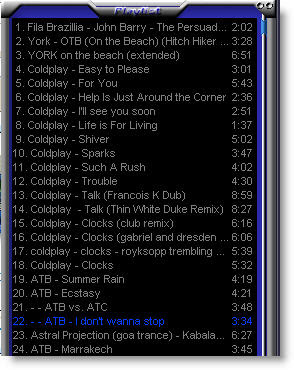
playlist before: press Alt and click songs which you like put in row playlist after: see numbers near songs lenght to determine plauling sequence

Compare these 2 playlists. When you create a new playing row of songs small numbers appear near the song's lenght. They mean in what sequence songs will be played. So when song ATB - I don't wanna stop ends instead of playing 23rd song Winamp will go to song No. 3 then to 11 - 7 - 24 - 14 and when track 14 (Coldplay - Talk) ends Winamp will continue to play normally from 14 and down (if shuffle is not enabled)

Free Some RAM and bOOst Your Computer Speed

You start your computer and everything looks fine but after hour or so you notice that computer runs much slower than usually. This could be because of viruses or more likely (because in case of virus or trojan you must see immediate slow down shortly after restart) it can be some programs still uses your computer's RAM even when you close them.

Here's a nice trick to free up all available RAM and you should see speed performance in a matter of seconds. What is more this trick doesn't require any program to install and waste time to run it.

1. At first go to your desktop and right click on it. Select New->Shortcut

create shortcut

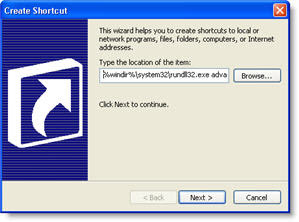
2. Copy this line to a pop up window

%windir%\system32\rundll32.exe advapi32.dll,ProcessIdleTasks

copy the code to shoertcut making window

Press next and name like "Clean Memory" or something similar. Press finish.

Now you have a shortcut on your desktop which cleans all memory taken by IDLE programs. Double click it whenewer you feel your computer is going slower for no reason.

shortcut image

Google Page Rank Massacre

Google Texas Chainsaw Massacre 1974 imitation

Everybody is talking about recent Page Rank changes, so do I. Not so long ago I wrote about how Google punished Statcounter. It seems that Google decided to clean the mess with Text-Link-Ads using sites because they made impact on those linked sites to gain good page ranks. Statcounter had a major decline from PR8 to PR6 recently. Other victims are:

Problogger.net (PR swinged from 7-4-6) Blogherald.com (declined from PR6 to PR4) MasterNewMedia.org (huge decline from PR7 to 6 and 4 (varies among different data centers)) Washingtonpost.com (from 7 to 5) paulstamatiou.com (from 6 to 4)

All these big sites practise link selling which is considered illegal by Google in order to gain good listings in search page results. However there is one trick to avoid any penalties from Google if you use nofollow atribute in your external links

The standart external link with nofollow html attribute looks like this:

<a href="www.unwanteddomain.com/" rel="nofollow">Link text</a>

Use this type of links when you don't need to give any SEO juice to the site or just aren't sure whether it is blacklisted or not.

Here you can see which parts of those mentioned websites was considered bad by Google

Blogherald statcounter washington post

How to Center Align Div Tag Element Using CSS?

CSS

If you're creating your design using css instead tables you could probably run into problem how to center div element in your page. There is no such css rule float:middle which probably could help to center this div.

The solution is very simple in fact. All you have to do is to define margin: 0 auto; property in your css code. For example you have some div like

<div id="container"> Content </div>
and want to center it in the page. In your CSS zone type:

.container{ width: 860px; margin:0 auto}
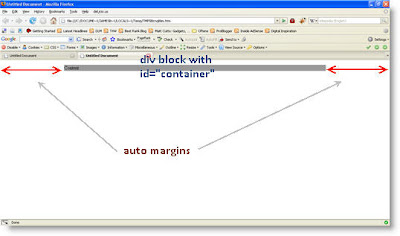
The result would be as shown in the picture bellow

css centering div block

You can test it out by copying the code below to your text editor (i.e. Notepad) and save it with .html extension.

<!DOCTYPE html PUBLIC "-//W3C//DTD XHTML 1.0 Transitional//EN" "http://www.w3.org/TR/xhtml1/DTD/xhtml1-transitional.dtd"> <html xmlns="http://www.w3.org/1999/xhtml"> <head> <meta http-equiv="Content-Type" content="text/html; charset=utf-8" /> <title>Tips4weblife.blogspot.com</title> <style type="text/css"> <

#container { width: 860px; margin: 0 auto; background:#999999; } </style> </head>

<body>

<div id="container"> <p>Content</p> </div> </body> </html>